
Ábaco: point of sale and inventory for your business
Manage your business, all in one place.
All-in-one business management app for small and medium businesses. POS, inventory, finance and reports in a single multiplatform app.
Everything your business needs
A single app with all the tools for business management.
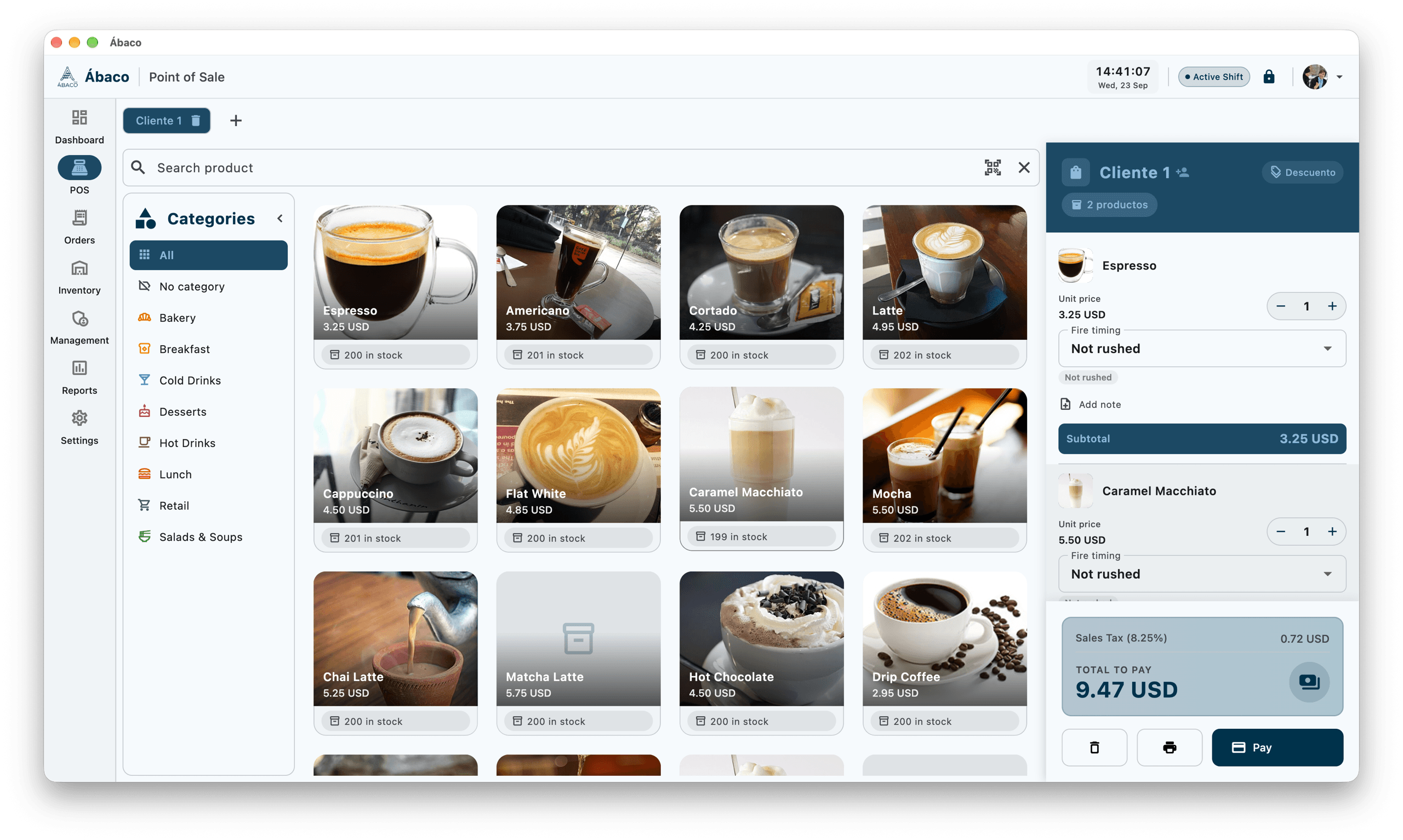
This is Ábaco in your business
Real screenshots of the app. No mockups: what you see is what you use.
- Instant product search and barcode scanning
- Stock visible on every product
- Discounts, notes and taxes in the same flow
Check out fast with a visual catalog, categories and a cart per customer.
- Instant product search and barcode scanning
- Stock visible on every product
- Discounts, notes and taxes in the same flow
Why Ábaco
Built for the reality of your business.
Who is Ábaco for?
Designed for a wide variety of businesses.
Frequently asked questions
Everything you need to know before getting started.
Do I need an internet connection to use Ábaco?
No. Ábaco runs entirely on your local network (LAN). Your data stays on your devices, with no dependency on external servers or an internet connection.
Which devices can I run Ábaco on?
Ábaco is available for Windows, macOS, Linux and Android, with an interface optimized for mobile, tablet and desktop. Your data goes with you to any device.
What kind of business is Ábaco for?
Retail stores, restaurants and cafés, warehouses and small businesses in general. It includes point of sale, inventory, customers and suppliers, expenses, returns and reports in a single tool.
Can multiple employees use it at the same time?
Yes. Ábaco is multi-user with roles and permissions to control who can access each feature, and it supports working shifts with register open and close.
Where is my business data stored?
Locally on your devices, in its own database. Ábaco does not send your information to external servers and includes no third-party trackers or analytics.
How does the app get updated?
Ábaco updates itself automatically in the background (Windows) with SHA-256 integrity verification on every update.
Available on every platform
No extra cost. Your data goes with you to any device.
Windows
31b99dd46b8eb1ab34c4e0a272cd21da20ae86b92c1bfa2fb49e18dc5e81e629macOS
576ea6f6a908b4e5570e3b8624e074ec24cbf4a9369550562d9e48519ace90a4Linux
7d24f994e42fdfdc1900f5e25e843e4b5a63be1e5ddae09a10cac7eb82ef2066Android
d05b783e0f45388fc3da66107ec8cd3610cc7d6c86f70fc2d58c5cfa58136a39Show release notes
- - gate admin debug tools behind the admin role
- - version ticket config JSON format
- - round money to cents in cart totals and payments
- - delete orphan avatar files when replacing a profile picture
- - sanitize image cache keys to prevent path traversal
- - keep the app alive on uncaught errors
- - run expense category icon repair only once
- - stub command gateway fails visibly when offline
- - uuid command ids and round fractional product stock
- - make v25->v26 comandas rebuild idempotent and self-healing
- - no quedar en invalid con licencia persistida ilegible
- - back up data before destructive v23->v24 migration
- - permitir retirar descuentos heredados en modo free
- - fail-open cuando un scheduleData es ilegible
- - support watchAll:comanda in query service and cache
- - fail-open conservador cuando la licencia es ilegible
- - repair migration crash for schemas <=35 (pm.key)
- - change ingredients tab icon to leaf
- - update product category and area icon codepoints to match AppIcons outlined variants
- - add factory reset provider with full app wipe and guard duplicate navigation prevention